How to cancel a service
Short answer: In the Client Area, open the service, select Cancel, choose Cancel at the end of the billing period (recommended) or Cancel immediate, give a reason and confirm. Cancel before the next renewal date to avoid another charge.
Before you begin
Section titled “Before you begin”- You need: the Client Area account that owns the service.
- Do first: download the backups you want to keep from the Game Panel (Backups > backup menu > Download).
- Time needed: 2 minutes.
What this guide covers
Section titled “What this guide covers”- The two ways to cancel
- What happens to your server and data
- Refunds
Which cancellation type?
Section titled “Which cancellation type?”| Type | What happens |
|---|---|
| Cancel at the end of the billing period | The server keeps running until the end of the time you’ve paid for, then it is deleted. No further invoices |
| Cancel immediate | The server is deleted straight away and you can’t use it any more |
-
Download any backups you want to keep (see How to create and restore a backup).
-
Go to https://client.hostitcreateit.com and open Services.
-
Select the service.
-
Select Cancel.
-
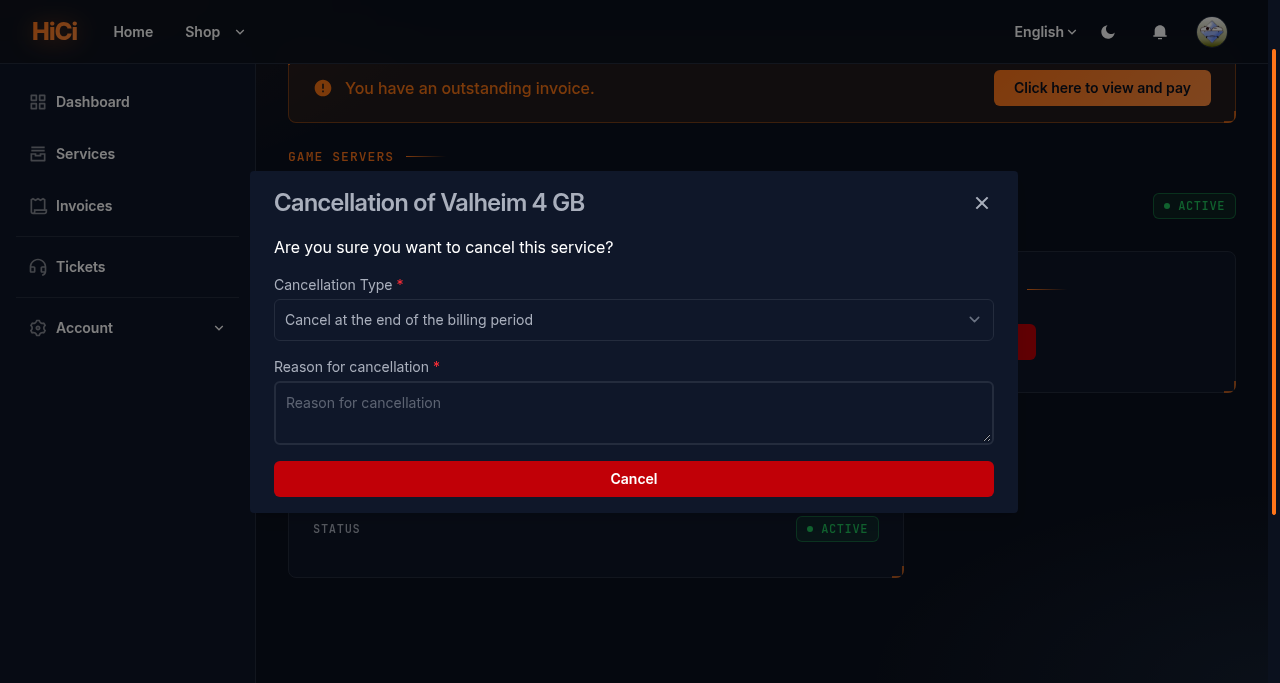
Under Cancellation Type, choose Cancel at the end of the billing period or Cancel immediate.
-
Fill in Reason for cancellation. It helps us improve.
-
Select Cancel to confirm.
-
Keep the confirmation email: our Terms of Service ask you to keep it as proof.
Expected result
Section titled “Expected result”The service shows Cancellation Pending (end of period) or Cancelled (immediate), and you receive a confirmation email.
Refunds
Section titled “Refunds”Our refund rules are in the Terms of Service, section 2.4 (https://hostitcreateit.com/terms): any reason within 24 hours of purchase, and up to 14 days for problems caused by us. Refunds are requested by support ticket.
Common mistakes
Section titled “Common mistakes”- Cancelling after the renewal invoice is paid. Cancellations must be made before the renewal date to stop the next charge.
- Choosing “Cancel immediate” by mistake. It deletes the server at once. Use end of period unless you need it gone now.
- Not downloading backups first. They are deleted with the server.
Troubleshooting
Section titled “Troubleshooting”| What you see | What it means | What to do |
|---|---|---|
| No Cancel button | The service is already cancelled, or has an open upgrade invoice | Check the service status; contact support |
| Still invoiced after cancelling | The invoice was created before you cancelled | Contact support with both invoice numbers |
When to contact support
Section titled “When to contact support”Contact support for refunds, if you didn’t receive a confirmation email, or if you’re still being charged after cancelling. Include the service name and the date you cancelled. See How to contact support with useful diagnostic information.
Related guides
Section titled “Related guides”Last reviewed: 2026-10-05 · Applies to: Client Area (1.5.8)